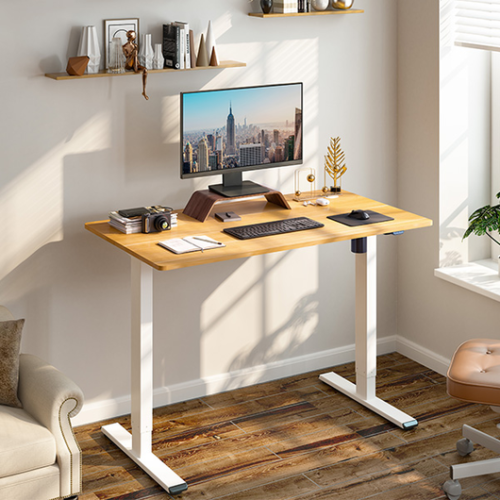
The New Flexispot Q8 standing desk. Have they nailed it with this new design for a healthier, more ergonomic way to work?
In this article we go into depth on the NEW Flexispot Q8 Adjustable height standing desk – from price and look, to ease of use and functionality.
Table Of Contents
Whether you work from home, or an office, your working environment and office furniture should offer flexibility to your working needs.
Whether that means you stand up at a desk, use an ergonomic chair, or even sit on a ball to do your work. With most of us spending around 5 – 8 hours a day at a desk, it’s important to make sure you’re comfortable. Yet also being kind to your body and joints. That’s where an ergonomic desk like this could help.
Related Post – How To Make The Most Of Working From Home
Sitting down for so long every day can cause issues all over your body. From back aches and neck pain to swollen legs and ankles. The human body was not made to sit in one position for so long, which is why so many issues can arise. An adjustable height standing desk can be very beneficial and help to keep you more mobile.
The Health Benefits Of A Standing Desk
There are potentially huge health benefits when it comes to having a standing desk to do your work.
Just a few of these include…
Burns more calories even if you stand still
Improves posture
Reduces Desk-Related Back Pain
Sitting for long periods of time is one of the main causes of back and neck pain. It puts a lot of unnecessary pressure on your spine.
However, by having regular breaks from sitting whether by having brief walks, or simply standing, you should notice an improvement in your back pain. This has been backed up by many research studies over the years. The latest of which was done in 2016 which showed standing desks improve chronic back and neck pain by up to 55%.
Aids better circulation
Better wrist position
Improves focus
Can help to improve your mood
Reduces weight gain if used with a walking treadmill or a decent fitness bike
The Flexispot Q8 Standing Desk
I hear you ask – is the Flexispot desk good? I have actually been using a Flexispot standing desk for many years now – before this one came out, I was using the pro series E7 standing desk. It was a great adjustable height standing desk that I used on a daily basis for work – both sitting and standing. Throughout the months in lockdown, it came in very handy as I put a walking treadmill underneath it.
Related Post – How To Make Your Home Office More Stylish
Having a treadmill with a standing desk meant I could get my daily 10k steps in whilst working, and not leaving the house. Of course, you don’t have to have your standing desk with a treadmill, you can just stand still if you’d prefer. Or, you could even get the Flexispot standing desk bike and cycle as you work!
So, I was very intrigued to see what would be better – if anything, about the new Q8 standing desk. Is it going to be a great standing desk with plenty of space to work on, without getting tangled up in the mess of cables underneath?

Flexispot Standing Desk Features
Adjustable Height – The E7 adjustable height standing desk had the electronically adjustable height feature – obviously. Along with a small control panel on the front to raise or lower it as needed. You could also set it to certain heights with its height presets function – one height adjustment for standing, and one for a seated height to make it quicker and easier to adjust.
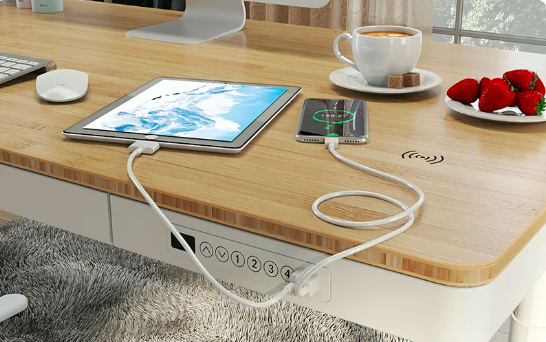
The Integrated Control Box – However, the Q8 is slightly different in that it has the control panel integrated into the desktop to make it look more sleek and streamlined. The lifting column in the desk also has anti-collision function blocks for better safety, which is ideal if you have children or pets.
If a child were to sneak underneath while you were lowering it, the safety feature would stop the desk from making contact. In addition to this, there is also a child lock button to stop anyone from playing around with it.
Related Post – 5 Ways To Make Your Home More Beautiful
The Quiet Dual Motor System – The Flexispot Q has a top of the range dual-motor to raise and lower the desk. Along with a pair of USB ports and a charging station on the rim. These are new features on the Q8 that the E7 didn’t have, and are very useful indeed!
The Drawer – The standing desk built-in drawer is the perfect size to keep any notepads, pens…etc for quick access. It’s also a new feature in the Q8. It opens on the front side of the desk, for ease, and a better user experience. It can fit a lot inside it for such a small drawer and doesn’t get in the way when the desk is in the standing position.
The Charging Ports – However, the best feature has to be the USB-type charging ports. I always seem to have at least one item on charge at all times. Whether it’s my Fitbit, phone, or even camera batteries, so the two-socket USB charger is ideal.
How To Setup The Q8 Standing Desk
This desk was very simple to set up and it was out of the box and ready to go in minutes. The Flexispot standing desk instructions are very clear to read and simple to follow.
The best thing to do is to set it up in the room you want to have it in. The desktop is quite heavy and hard to manoeuvre once the also heavy legs are attached.
The standing desk motor kit is very easy to assemble, and there is a small compartment underneath the desktop for it to sit in out of the way.
Related Post – 3 Ways To Make Your Online Business More Present
Once you have everything attached, you simply plug it in and set the desktop to the height you desire. However, with the rise of energy prices, the last thing you want is to have another power socket on all day.
Once you have your desk at the right height, simply turn it off at the plug and your desk will stay in the correct position. It does however mean that if you do want to change the height, you will need to turn it back on at the plug – not too big a deal I hope!
What Is The Ideal Height For A Standing Desk?
Of course, the standing desk height will be different from person to person. You may need to fiddle a bit with the height, to begin with, to find the perfect height for you.
The standing desk position will be different from the seated desk position, so make sure you work out both of these specific heights. This is a great sitting to a standing desk and works well for both options. For example, if the current height of the desk doesn’t work for you, simply adjust the desk setup until it does.
If you find your standing desk has a wobble, whether, at the standing or the seated position, you could put gym mats underneath to give it some more stability. However, the wobble is only really likely if you have your adjustable height desk on the carpet. On a hard floor, you shouldn’t have any issues with a wobble.



The Flexispot Q8 Extra Features
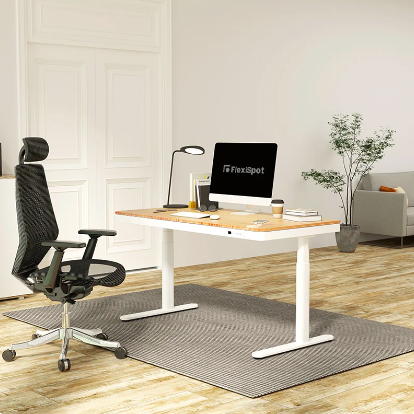
Multi Use – Because the Flexispot adjustable desk is so versatile, you could use your standing desk for gaming as well as working. It offers ample space for more than one computer screen and room to spread out. The USB charging stations are great should you need to charge up your headphones, mobile devices or even your gaming controller.
Related Post – How To Create The Perfect Work-Life Balance
The Table Top – Another difference between the E7 and the Q8 desks is that with the E7 you could choose the design of the tabletop. So for example, you could choose a standing desk with an oak desktop, or maple even. However, with the Q8 you can only opt for the bamboo table top. You can, however, still change the colour of your standing desk frame from white to black.
The Integrated Cable Management Tray – The first thing that I loved about both of these flexispot height-adjustable standing desks was actually the underside of the desk because of the cable tray. The last thing you want while trying to work is to get tangled up in all of the cables, especially, if like me, you like to have a footstool.
A good cable management system is a must for the perfect office space. As is a nice comfy office chair for when you do want to sit down for a while too. Feeding cables from the front to the back (or wherever your plugs are) is simple to do and makes the underside of the desk look much neater.
The Size – The spacious desktop measures – 140cm by 70cm, making it a good size for working on. Whether working from home in a spare bedroom or in an office. Especially if you need to have room for paperwork, files…etc.
Where To Buy The Flexispot Standing Desk?
You can buy your Flexispot standing desk from amazon, or even direct from the Flexispot website. However, if you want to choose the leg and desktop combination, it’s better to get it direct.
The current price of the Q8 standing desk is £699.99 – however, use code SALE10 to bring it down to £629.99. Yes, it is expensive for a desk but it has so many uses. Plus, it’s so well designed it should last you for years!
Related Post – 7 Signs You Have An Unhealthy Work Life Balance
So, which is the best Flexispot standing desk? I would definitely have to say the Q8, even at the much higher price. It looks better, has better features and just seems more streamlined and less bulky than the E7.
Are standing desks worth it? Yes, personally I think the Q8 is one of the best standing desks. Whether you just want a standing desk for your laptop, desktop computer, or to use every now and again for a different environment to work at! Standing desks should be one of the main essential elements of a home office, both for comfort and health.
Do you think a standing desk could be a much healthier option for long-term use? Would you invest in yourself and purchase a height adjustable desk?
I really like the idea of having a standing desk and have seen oplenty of people adding a walking treadmill under it too! I think that already alternating from standing and sitting would be so helpful for posture and mood too! x
Oh it’s great if you don’t have the time to go our during the day and get many steps done. Yes, simply going from standing to sitting makes a big difference, especially if you struggle to focus. Thank you so much for taking the time to read the article.
I got adjustable desk at the day job office, not my desk but since it’s currently free I do use it sometimes because I love the option of switching between standing and sitting. Great review!
Oh that’s amazing you get to use one at work. Yes, i love being able to choose to sit or stand. Makes it a bit more interesting – haha!!